

We independently review all recommendations. Purchases made through our links may earn us an affiliate commission. Here’s how it works.
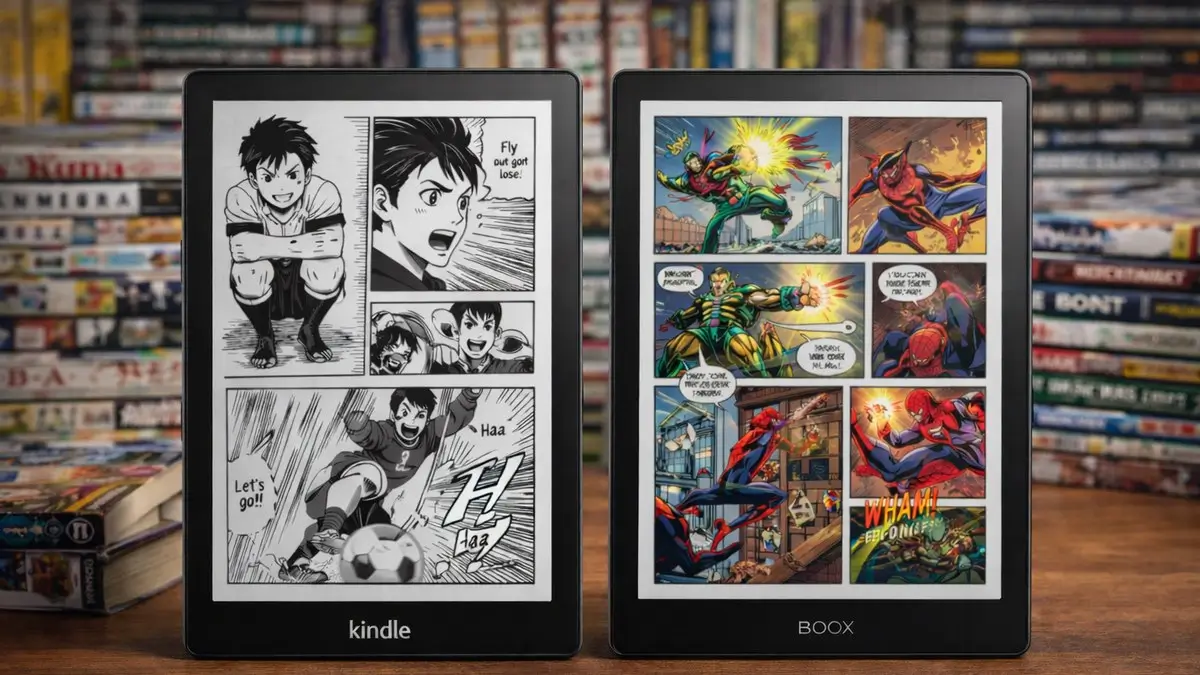
The short answer: for most manga readers, a color e-reader with a 7-inch screen is the sweet spot. The Kindle Colorsoft is the easiest choice if you buy from Amazon, and the Kobo Libra Colour is the better value if you borrow from libraries or load your own files. If you only read black and white manga, a Kindle Paperwhite does the job for much less. Larger 10-inch devices like the Boox Tab Ultra C Pro suit double-page spreads and Western comics, but they cost more and have real tradeoffs.
Color e-readers use E Ink Kaleido 3 panels, which show about 4,096 colors at 150 ppi in color and 300 ppi in black and white. Colors look muted, closer to newsprint than a tablet, and that is true of every model here. If you’re planning accessories for your new device, see our guide to must-have e-reader accessories.
How we pick these: we don't run lab tests, and we don't claim hands-on use unless we say so. Specs come from manufacturer and retailer pages, and real-world notes come from owner reports on MobileRead and Reddit. Prices are pulled live from our Amazon price tracker and can change at any time, so confirm them on Amazon before you buy. Our method
Quick picks

Color Kaleido 3 screen and Amazon's large manga library, with Panel View.

Page-turn buttons, OverDrive borrowing and native CBZ/CBR files.

Same color screen type in a 6-inch body, but small for comics.

10.3-inch color screen with Android and every manga app. Check stock first.

7-inch screen, waterproof, much cheaper than the color models.
1. Kindle Colorsoft
Best overall for most readers
Why it wins: a sharp color display, Panel View for zooming into individual panels, and Amazon’s large manga library. Color E Ink shows muted colors compared with an LCD tablet, so panels look closer to the printed pages many readers grew up with.
Amazon sells more than one version. The standard 16GB Colorsoft has a 7-inch color display (300 ppi black and white, 150 ppi color), IPX8 waterproofing, and a battery that Amazon rates at up to 8 weeks based on half an hour of reading a day with wireless off. It weighs about 215 g. The Signature Edition (32GB) adds extras such as wireless charging and an auto-adjusting front light. Amazon’s own pages are inconsistent about exactly which extras the standard model includes, so check the listing before you buy. For manga alone, the standard 16GB model is usually the better value if you don’t need the extras. Our tracker currently shows the newest 16GB model as a pre-order, and prices have moved recently, so check the live price.
What to know: there are no page-turn buttons, and colors are less vibrant than a tablet’s.
Specs:
- 7-inch color E Ink display (150 ppi color, 300 ppi black and white)
- IPX8 waterproof
- Amazon rates battery life at up to 8 weeks
- Panel View for zooming into individual comic panels
Best use: readers already invested in Amazon’s ecosystem who want color covers and pages without switching platforms. If you’re unsure whether paying extra for color is worth it, read our breakdown of whether cheap e-readers are actually worth it.
2. Kobo Libra Colour
Best value
Why it wins: physical page-turn buttons, built-in library borrowing, and a lower price than the Colorsoft.
According to Kobo, the 7-inch screen shows color at 150 ppi and black and white at 300 ppi, it’s rated IPX8 waterproof, and it has 32GB of storage. It reads CBZ and CBR comic files natively, so DRM-free manga is a matter of copying files over USB. One MobileRead user who switched to it describes color manga as a joy.
Drawbacks: at 7 inches, full-size US comics and graphic novels look small. Some users report palm rejection issues.
Specs:
- 7-inch color E Ink Kaleido 3 display
- 32GB storage
- IPX8 waterproof
- Page-turn buttons
- Stylus support (the Kobo Stylus 2 is sold separately, listed at $69.99 on Kobo’s US site)
- Kobo rates battery life at up to 40 days (30 minutes of reading a day, light at 30%, wireless off)
Best use: budget-conscious manga fans who borrow from libraries through OverDrive or Libby, sideload files, and want physical buttons. Our guide to budget-friendly e-readers covers more affordable options.
3. Kobo Clara Colour
Cheapest color entry point
The Clara Colour uses the same Kaleido 3 color screen type as the Libra Colour in a 6-inch body, with 16GB of storage and an IPX8 rating, according to Kobo. It reads CBZ and CBR files natively. It has no physical page-turn buttons, and at 6 inches comic pages are small.
Best use: manga covers and casual color reading on a tighter budget. If your main goal is comics, the 7-inch Libra Colour is the safer choice.
4. Boox Tab Ultra C Pro
Best for serious collectors and large pages
Why it wins: a 10.3-inch color E Ink screen suits double-page spreads and Western comics, and Android with Google Play means you can install manga apps such as VIZ, Manga Plus, Shonen Jump, K Manga and Manga UP!, plus Kindle, Kobo and Libby.
Specs (from Boox’s own page):
- 10.3-inch E Ink Kaleido 3 screen (150 ppi color, 300 ppi black and white)
- Android 12 with Google Play, 6GB RAM
- 128GB storage with a microSD slot
- Supports CBZ, CBR, PDF, EPUB and more
- Stylus included, about 450 g and a 4,600 mAh battery
What owners say: most reports on MobileRead cover the non-Pro Tab Ultra C, which uses the same kind of screen. One owner who reads manga daily found black and white text sharp and ghosting minimal after adjusting the reading app and refresh settings. Other owners describe the color as pale, and one still preferred a smaller device for manga. Dead pixels were reported on color screens. We found no owner reports comparing manga performance between the Pro and the non-Pro model, and most of those threads are a couple of years old.
Price and stock: Boox’s own shop lists it from $599.99 and shows order buttons, while Amazon’s listing currently shows it as unavailable with no restock date. Stock looks inconsistent between stores, so check both before you plan around it.
Best use: comic book readers who want one device for Kindle, Kobo, Libby and manga apps and can accept a heavier, pricier tablet.
5. Kindle Paperwhite
Best for black and white manga
Why it wins: the most affordable option here, with a 7-inch screen, a warm light that adjusts from white to amber, and sharp black and white pages. Most manga is printed in black and white anyway.
Specs:
- 7-inch monochrome display (300 ppi)
- IPX8 waterproof
- Amazon rates battery life at up to 12 weeks
- 16GB storage
Drawbacks: no color, so you’ll miss color spreads and vibrant covers. If you’re buying your first e-reader for school and reading manga on the side, see our picks for the best e-readers for students.
Best use: readers who only read black and white manga and want maximum battery life.
Manga e-readers compared side by side
Specs come from Amazon and Kobo product pages. Battery figures are the makers' own ratings, based on 30 minutes of reading a day. The Boox Tab Ultra C Pro is left out because Amazon lists it as unavailable.
| Our pick | ||||
|---|---|---|---|---|
| Screen | ||||
| Screen | 7-inch color | 7-inch color | 6-inch color | 7-inch black and white |
| Sharpness | ||||
| Sharpness | 300 ppi (150 ppi color) | 300 ppi (150 ppi color) | 300 ppi (150 ppi color) | 300 ppi |
| CBZ/CBR comics | ||||
| CBZ/CBR comics | Convert with KCC | Yes | Yes | Convert with KCC |
| Page-turn buttons | ||||
| Page-turn buttons | No | Yes | No | No |
| Storage | ||||
| Storage | 16GB | 32GB | 16GB | 16GB |
| Waterproof | ||||
| Waterproof | IPX8 | IPX8 | IPX8 | IPX8 |
| Library borrowing | ||||
| Library borrowing | Libby in the US | Built-in Libby | Built-in Libby | Libby in the US |
| Battery (maker) | ||||
| Battery (maker) | Up to 8 weeks | Up to 40 days | Up to 42 days | Up to 12 weeks |
| Price | ||||
| Price | $289.99 as of Oct 19, 11:06 am |
$257.99 as of Oct 19, 11:06 am |
$179.99 as of Oct 19, 3:44 pm |
$199.99 as of Oct 19, 1:51 pm |
How to read manga files on an e-reader
Which device you pick changes how easy it is to load your own files.
- Kobo: supports CBZ and CBR natively, according to Kobo. Connect it by USB, copy the files into the device and they import.
- Kindle: needs conversion first. The usual route is the free Kindle Comic Converter (KCC): choose your Kindle model, turn on manga style for right-to-left reading, and copy the converted file to your Kindle. KCC’s own documentation says Panel View is switched on from the Aa menu on the Kindle itself.
- Boox and other Android e-readers: apps like the Kobo and Kindle apps, plus comic readers, handle files and store purchases. KOReader, an open-source reader, also supports comic files with a panel view feature.
- File tip: CBR files can misbehave in some readers. If one won’t open, repack it as CBZ, and use PNG or JPG images rather than WebP.
Owners disagree on a few details, such as whether KOReader reads CBR directly, so test one file before converting a whole library.
Key features for manga and comics
Screen size: a standard manga volume is about B6 size (roughly 5 by 7 inches), so a 7-inch e-reader shows a page close to its printed size. US comics are larger, around 6.6 by 10.2 inches, so 10-inch screens feel more natural for them, at the cost of weight and price.
Color vs black and white: most manga is black and white, so color matters mainly for covers, color spreads and Western comics. Color models cost more and are less sharp in color than in black and white.
File format support: CBZ, CBR, PDF and EPUB are the key formats. Kobo and Boox open comic archives natively. Kindles need conversion.
Platform: Kindle, Kobo and Nook devices offer wide stores with similar content. Android e-readers with Google Play can install the official manga apps, which often offer same-day English releases.
Real reader scenarios
- Casual manga fan (Shonen Jump, popular series): Kindle Colorsoft. Amazon’s library covers mainstream series, Panel View helps on a 7-inch screen, and color brings covers to life.
- Budget reader who uses a library: Kobo Libra Colour. OverDrive and Libby are built in, the page buttons prevent accidental taps, and it costs less than the Colorsoft.
- Serious collector (100+ volumes, multiple sources): Boox Tab Ultra C Pro. Install VIZ, Manga Plus, Kindle and Kobo apps, and use the 10.3-inch screen for double-page spreads.
- Black and white manga purist: Kindle Paperwhite. Save the money and get the longer battery life.
- Western comics and graphic novels: a larger screen helps, because wide panels become small and hard to read on 7 inches.
What to skip
- Tablets for long sessions: an LCD tablet shows more vivid color, but E Ink is generally easier on the eyes for long reading sessions.
- Older color E Ink devices: earlier Kaleido and Kaleido Plus panels have weaker color than Kaleido 3. Look for Kaleido 3 models.
- Kindle Scribe: overkill for reading alone. The 10.2-inch screen is great, but it’s priced for note-taking.
Frequently asked questions
Is a color e-reader worth it for manga?
Only if you read color spreads, covers or Western comics. For black and white manga, a Paperwhite reads as well and costs much less.
Can I read manga on a Kindle?
Yes. Buy volumes from Amazon, or convert your own CBZ/CBR files with Kindle Comic Converter and copy them to your Kindle.
Which e-reader has the biggest screen for comics?
Among the devices here, the 10.3-inch Boox Tab Ultra C Pro. The Kindle Colorsoft and Kobo Libra Colour are 7 inches. Kobo’s Elipsa and the Kindle Scribe are larger, but they’re built for note-taking and cost more.
Kindle or Kobo for manga?
Kindle has the larger store and Panel View. Kobo reads comic files natively and has built-in library borrowing, which suits sideloaded and library manga.
Final verdict
- Most manga readers: Kindle Colorsoft balances price, color and Amazon’s manga library. The newest 16GB model is listed at $289.99, so check availability before you order.
- Best value: Kobo Libra Colour at $257.99 adds color, buttons and library access.
- Enthusiasts: Boox Tab Ultra C Pro for 10.3 inches, Android apps and annotation, if you can find it in stock.
- Budget priority: Kindle Paperwhite at $199.99 handles black and white manga well.
Want an Android alternative with the same Kaleido 3 color tech at a lower price? Our Meebook M8C review covers what you gain and lose by skipping the big brands. And if you’re weighing ecosystems in general, see our full Kindle vs Kobo vs Boox comparison, or our guide to the best e-readers of 2026 for every category.
Sources (13)
- Kobo: Kobo Libra Colour product page, Kobo Clara Colour product page, Kobo Stylus 2, File formats Kobo supports
- Amazon: Kindle Colorsoft 16GB listing, Kindle Paperwhite 16GB listing, BOOX Tab Ultra C Pro listing
- BOOX: Tab Ultra C Pro shop page
- MobileRead owner threads: Boox Tab Ultra C impressions, Boox Ultra C 10.3 color and lighting, Libra Colour owner thread, How to read manga in KOReader
- Tools: Kindle Comic Converter on GitHub